Post AI
Analytics-driven automation tool. Configure rules for automatic actions and receive notifications when metric thresholds are reached.
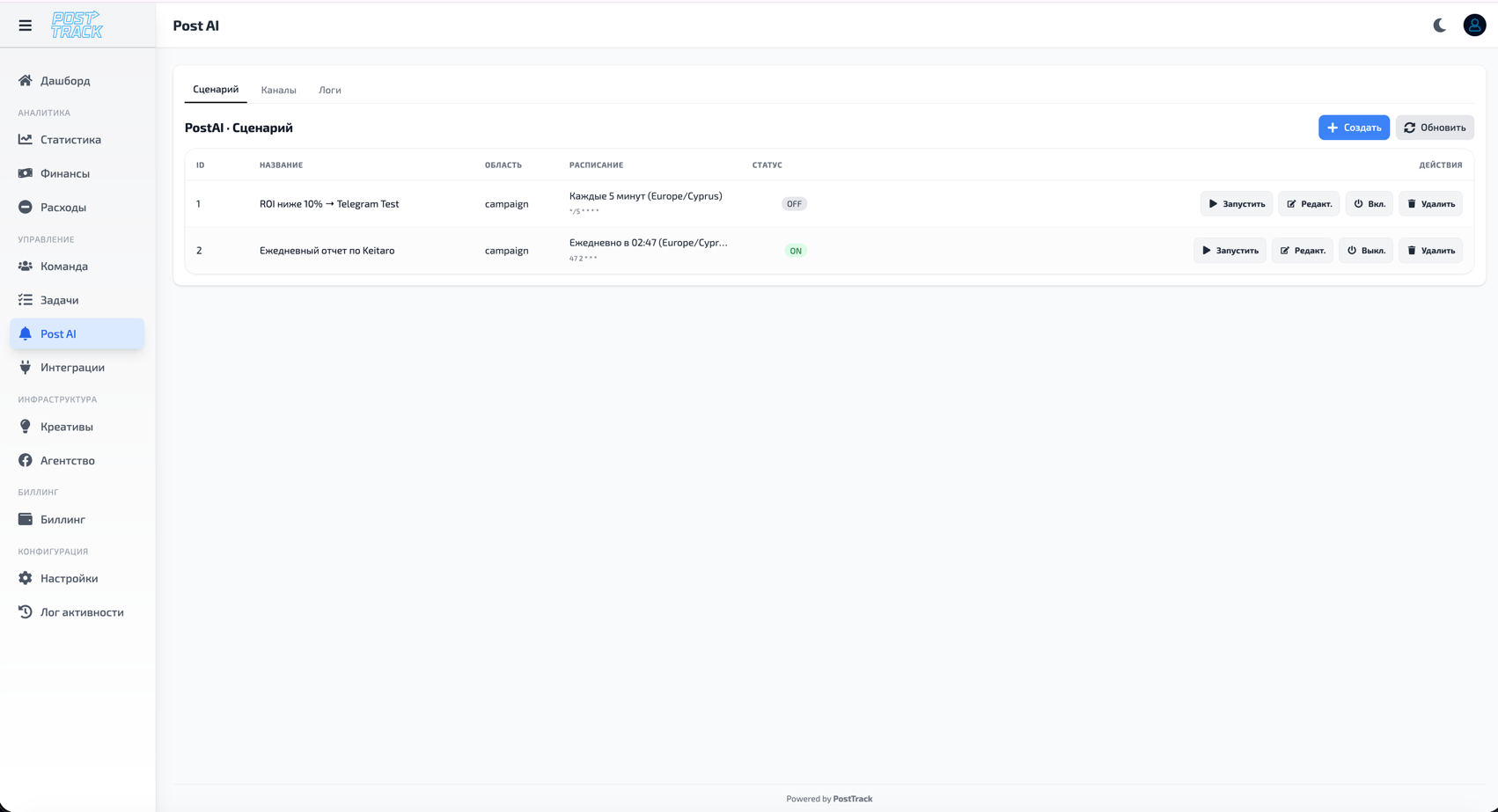
Capabilities
PostAI helps automate routine tasks and monitor key metrics without constant manual oversight.
Signals
Automatic notifications when set conditions are met.
How it works:
- You configure a condition (e.g., "ROI less than 10%")
- System continuously monitors metrics
- When condition triggers, you receive a notification
- You can quickly react and make decisions
Notification types:
- PostTrack system notifications
- Email alerts
- Telegram messages (with configured integration)
- Push notifications
Auto Actions
Automatic execution of actions when rules trigger.
Example actions:
- Change campaign status
- Create task for responsible person
- Send notification to specific employee
- Mark object for attention
- Add comment/note
Safety:
- All automatic actions are logged
- Actions can be undone or rolled back
- Full trigger history available in Activity Log
Rule Configuration
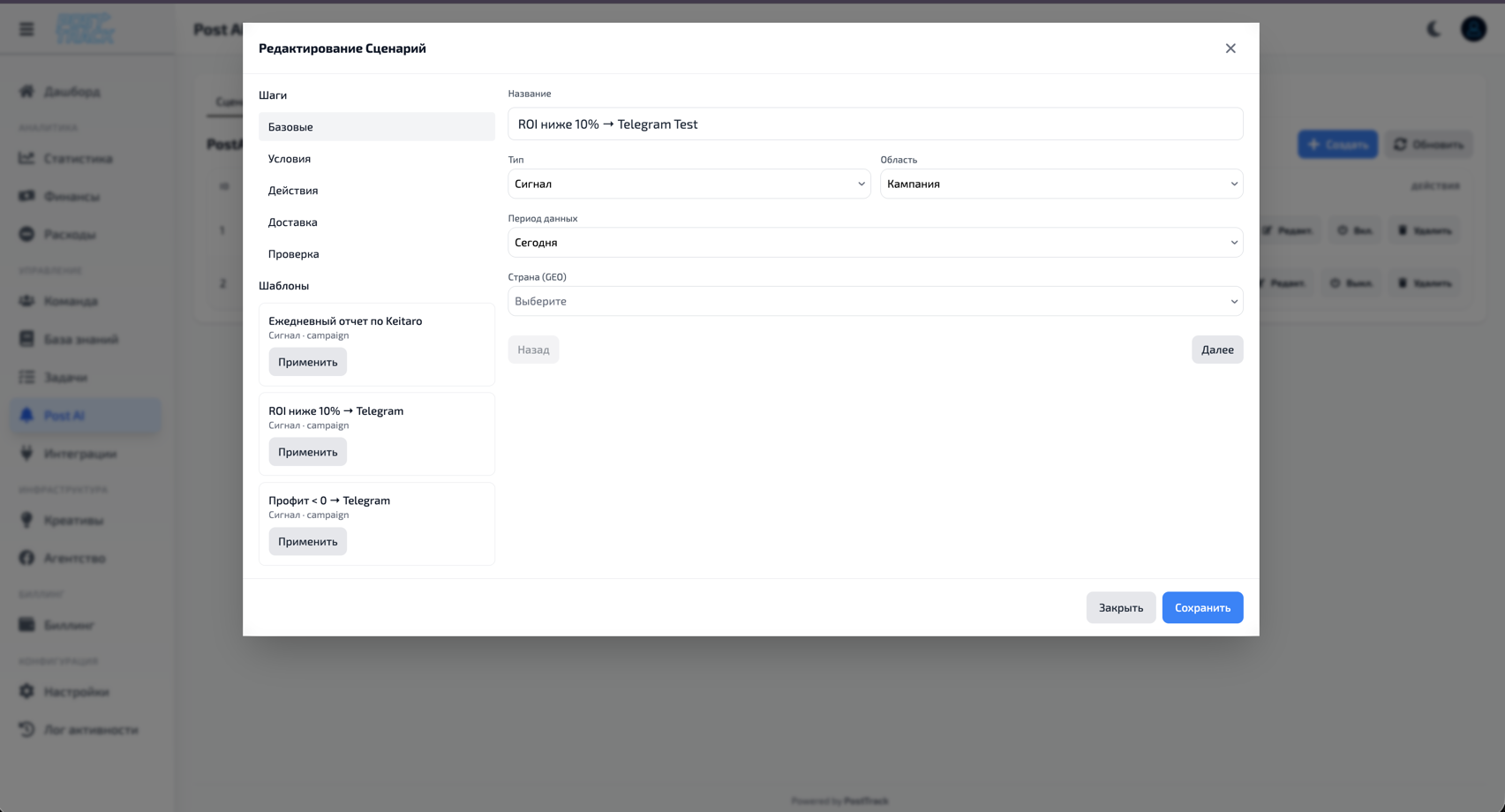
Rule Structure
Each rule consists of:
- Name - clear name for quick search
- Conditions - metrics and threshold values
- Actions - what to do when triggered
- Frequency - how often to check conditions
Condition Setup
Available metrics:
- ROI - return on investment (percentage)
- Revenue - total revenue/income
- Spend - advertising costs
- Profit - net profit
- Lead Count - number of conversions
- CR (Conversion Rate) - conversion percentage
- CPL (Cost Per Lead) - lead cost
- CPA (Cost Per Action) - action cost
Comparison operators:
- Greater than (>)
- Less than (<)
- Equal to (=)
- Greater than or equal to (≥)
- Less than or equal to (≤)
- Not equal to (≠)
Combining conditions:
- Single condition - simple rule by one metric
- Multiple conditions (AND) - all conditions must be met
- Multiple conditions (OR) - at least one condition
- Complex conditions - combination of AND + OR for advanced logic
Rule Examples
Example 1: Low ROI Control
Task: Receive notification if ROI drops below 15%
Setup:
- Condition: ROI < 15%
- Signal: Telegram notification + Email
- Action: Create task "Check campaign with low ROI"
- Check: Every hour
Result: When ROI falls below 15%, you'll know immediately and a task is automatically created for review.
Example 2: Profitability Tracking
Task: Monitor campaigns where profit has dropped
Setup:
- Condition 1: Profit < $1000
- Condition 2 (AND): ROI < 20%
- Signal: Push notification
- Action: Add tag "Requires Attention"
- Check: Every 3 hours
Result: Rule triggers only when both conditions are met.
Example 3: High Lead Cost
Task: Monitor CPL growth
Setup:
- Condition: CPL > $50
- Signal: Email to supervisor
- Action: Stop auto-actions for this campaign
- Check: Every 30 minutes
Result: When CPL threshold is exceeded, campaign is automatically marked for manual review.
Example 4: Complex Rule
Task: Identify potentially problematic campaigns
Setup:
- Condition 1: ROI < 10%
- Condition 2 (OR): Spend > $5000
- Condition 3 (AND): CR < 2%
- Signal: System notification + Telegram
- Action: Create task + Send notification to buyer
- Check: Every 2 hours
Result: Complex logic allows tracking multiple factors simultaneously.
Workflow
Creating a Rule
- Open Post AI section
- Click "Create Rule"
- Specify name and description
- Configure conditions:
- Select metric
- Set comparison operator
- Specify threshold value
- (Optional) Add more conditions
- Choose actions when triggered
- Set check frequency
- Save rule
Managing Rules
Rule actions:
- Enable/Disable rule
- Edit conditions
- Change actions
- View trigger history
- Delete rule
- Duplicate to create similar
Monitoring:
- List of all active rules
- Trigger statistics
- Recent executed actions
- Each rule's effectiveness
History and Logs
All rule triggers are recorded:
- When rule triggered
- What metric values were
- What actions executed
- Who created/modified rule
- Full information in Activity Log
Use Cases
For Buyers:
- Control campaign ROI
- Monitor spending
- Track CPL and CPA
- Quick reaction to metric drops
For Managers:
- Control project profitability
- Critical event notifications
- Automatic problem escalation
- Team effectiveness overview
For Project Managers:
- Create tasks when problems occur
- Monitor project KPIs
- Automatic attention distribution
- Notify responsible parties
Important
- Automated with control - all actions logged and can be undone
- Flexible conditions - combine metrics for precise tuning
- Time savings - system works 24/7 instead of manual monitoring
- Quick reaction - learn about problems instantly
- Security - critical actions require confirmation
Why
- Don't miss problems - system tracks metric changes even at night
- Reduce routine - no need to manually check dozens of campaigns
- Quick reaction - respond to problems in minutes, not hours
- Scaling - easily control hundreds of campaigns
- Focus on important - handle strategy while AI monitors metrics
- Prevent losses - stop unprofitable campaigns before major losses
Planned for Future
Additional features in development:
- Chat assistant for data analysis
- Metric forecasting based on historical data
- Campaign optimization recommendations
- Automatic learning from your data
Related Sections
- Statistics — data for rule analysis
- Dashboard — rule trigger overview
- Tasks — automatic task creation
- Activity Log — all actions history