Facebook Ads Integration with PostTrack (via System User)
The connection is made by your Business Manager administrator. All steps take 10–15 minutes.
What You'll Need
- Administrator access to your Business Manager.
- Our App ID (PostTrack app in Meta for Developers).
- Ability to create System User in your BM.
- System User token with
ads_readpermission (optionallybusiness_managementfor reading BM structure).
Step 1. Add PostTrack App to Your BM
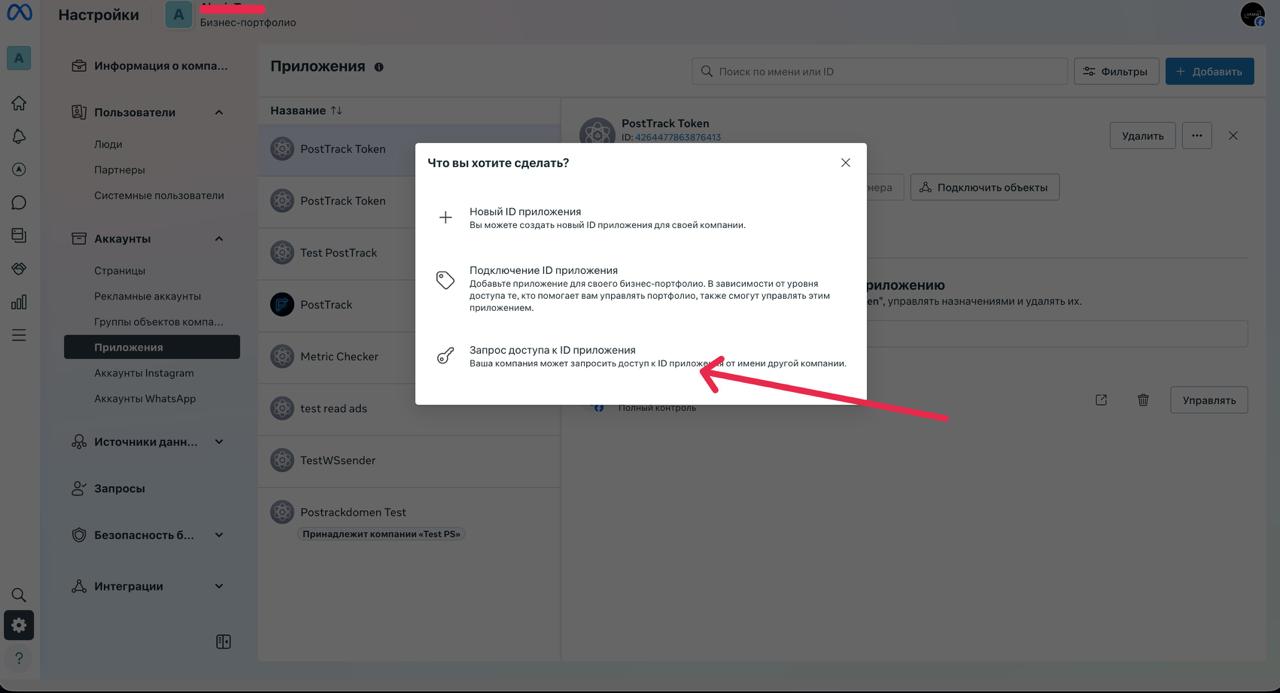
- Open Business Settings.
- Go to Accounts → Apps → Add → Connect an App ID.
- Paste PostTrack App ID and confirm.
Step 2. Create System User (Read-Only)
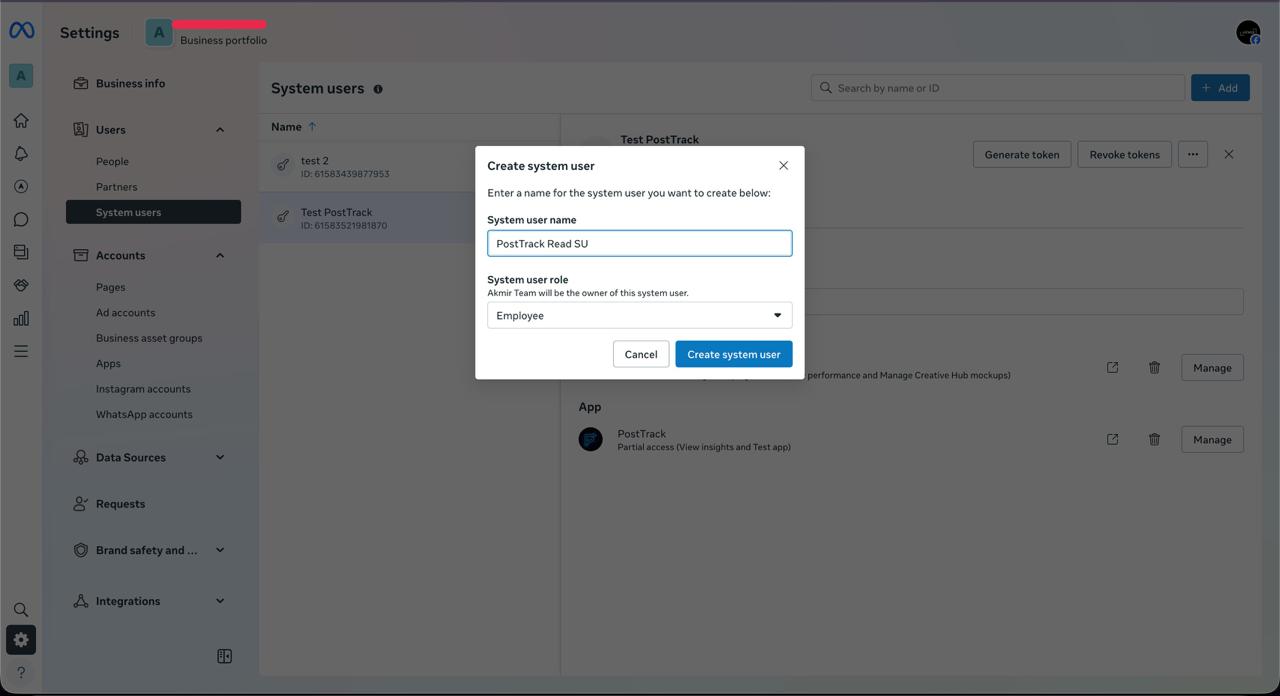
- Business Settings → Users → System Users → Add.
- Type: Employee.
- Name: e.g., PostTrack Read SU.
Step 3. Link System User to App
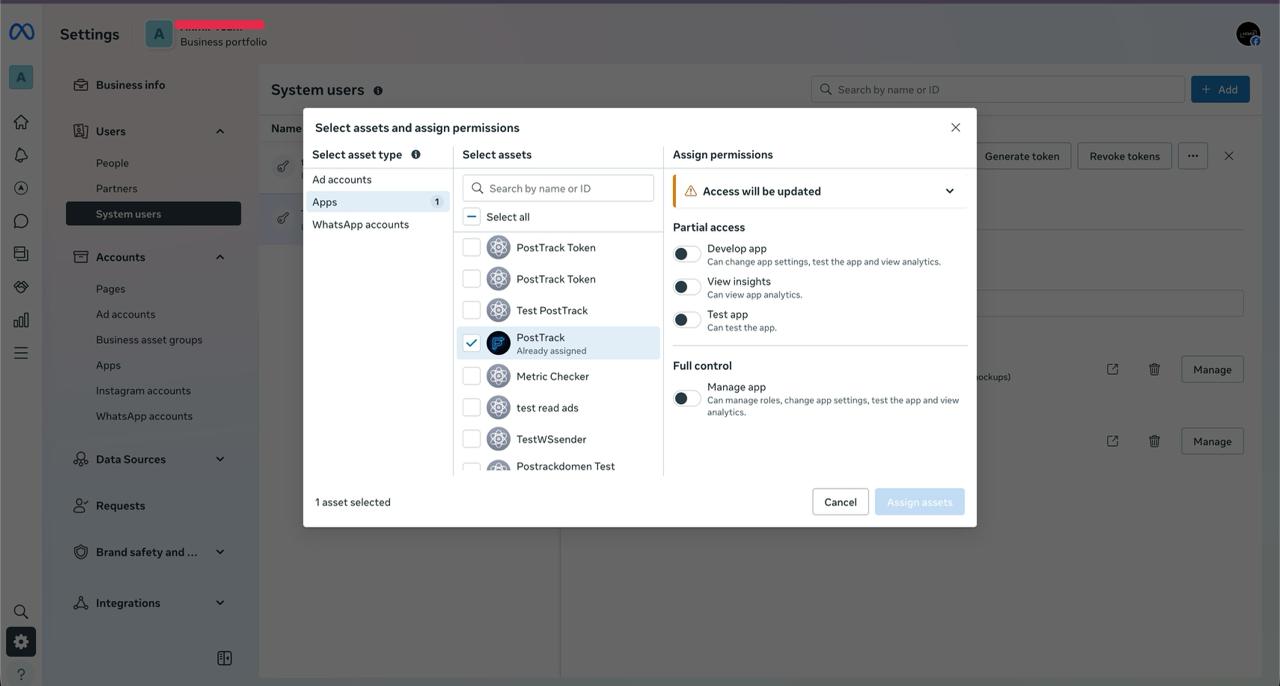
- Open the created System User card.
- Add Assets → Apps → select PostTrack → Assign.
Step 4. Give System User Access to Ad Accounts
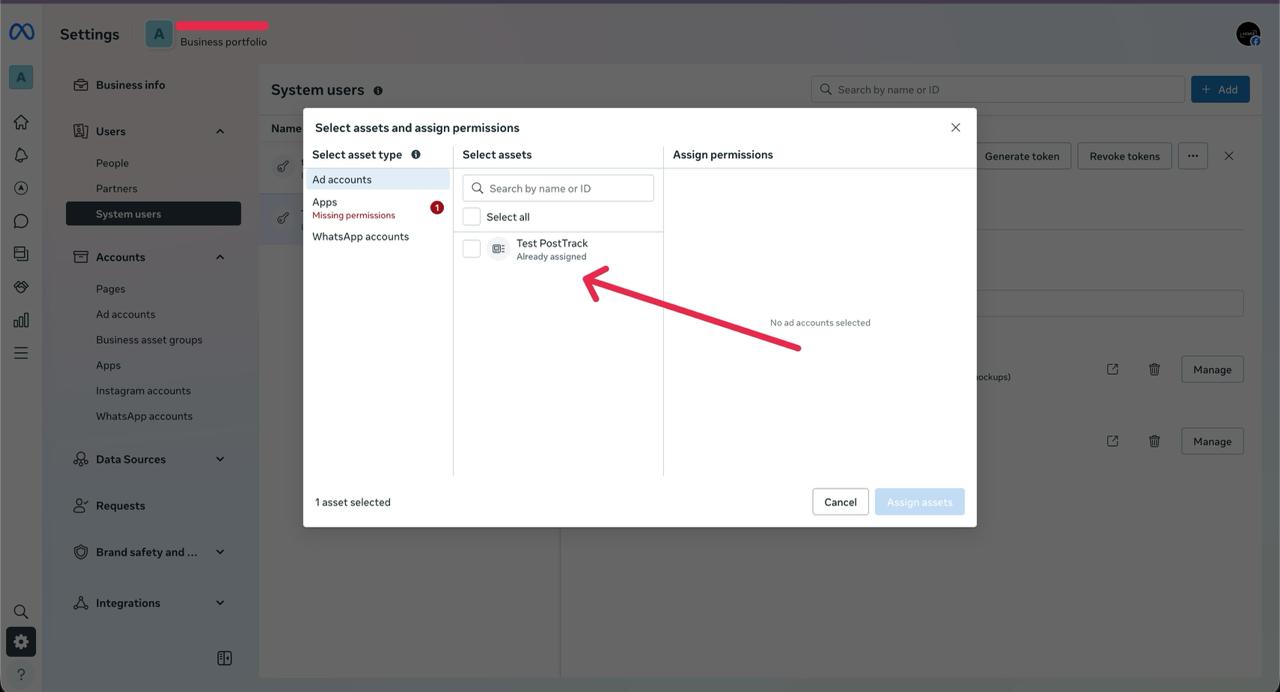
- In System User card, click Add Assets → Ad Accounts.
- Select all needed accounts.
- Role: Ad Account Analyst (read-only).
- If available — enable option for all current and future accounts.
To read creatives/catalogs, additionally grant Read on Catalogs / Pixels.
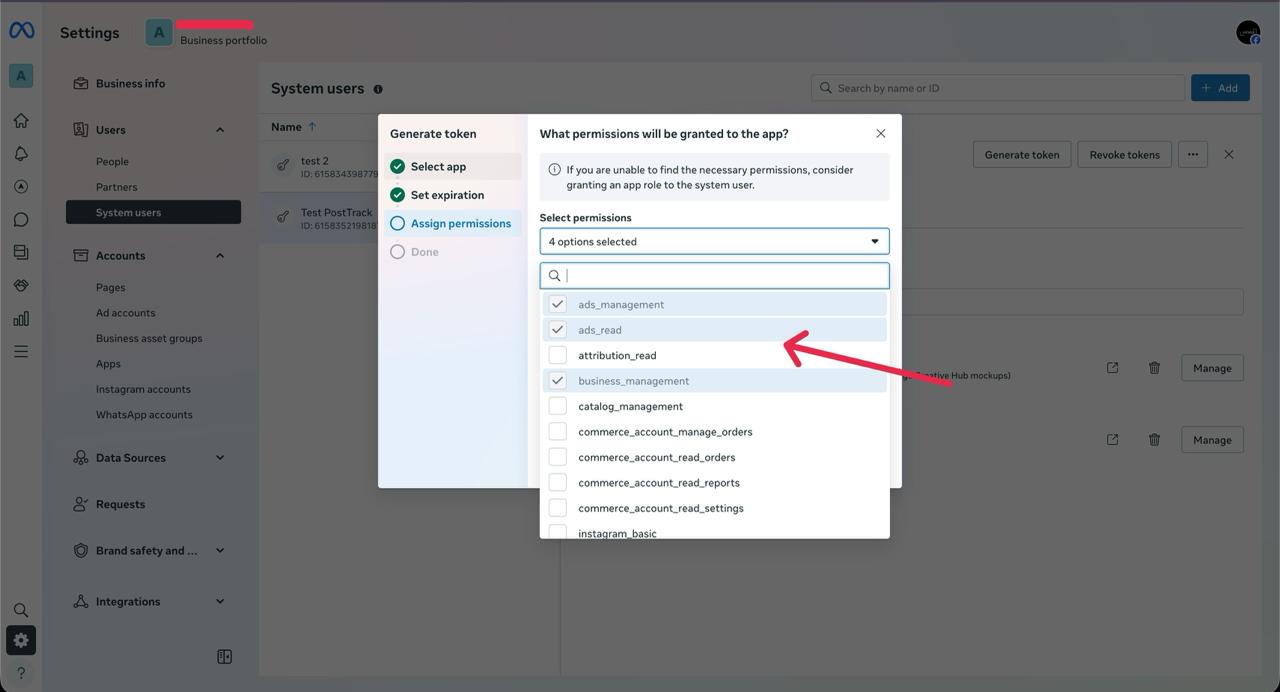
Step 5. Generate System User Access Token
- In System User card, click Generate New Token.
- App: PostTrack.
- Duration: maximum available.
- Permissions (scopes): minimum
ads_readandread_insights, optionallybusiness_management(read). - Copy Access Token and save.
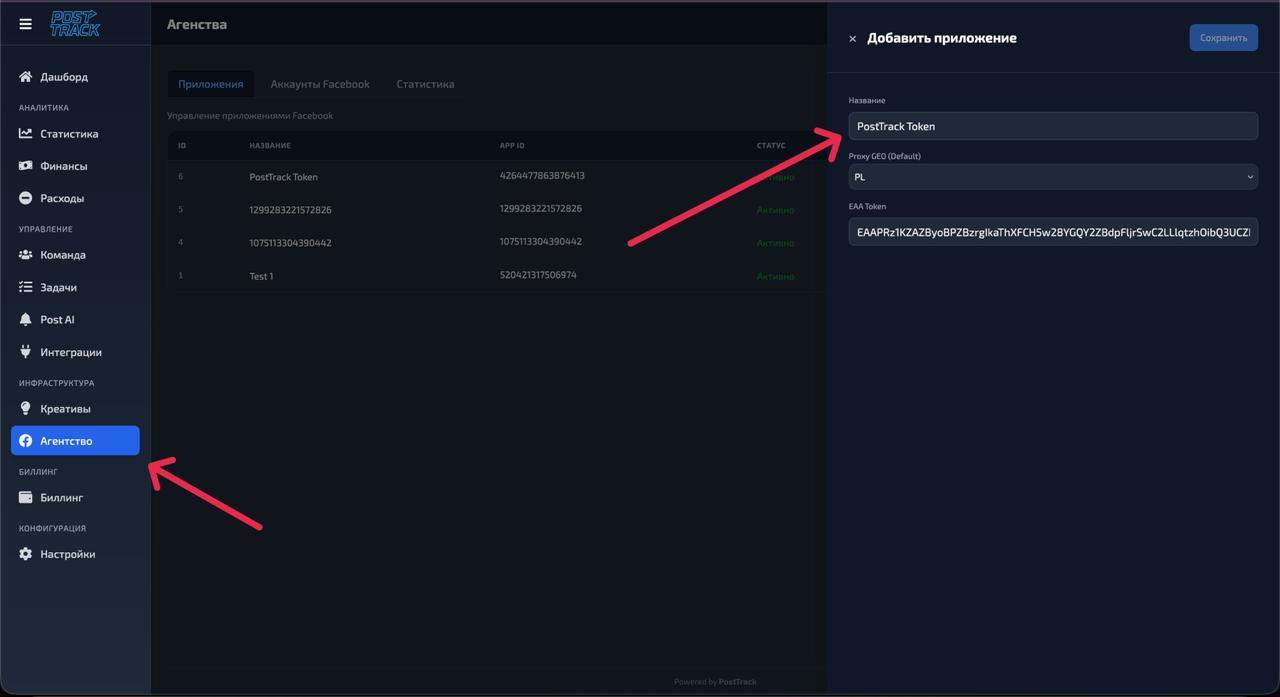
Step 6. Insert Token in PostTrack
- In PostTrack: Integrations → Meta Ads → Secure Mode (System User).
- Paste Access Token and save — validation and import will begin.
What PostTrack Does After Token Insertion
- Token validation:
GET https://graph.facebook.com/v19.0/me?access_token=...- (optionally)
GET /debug_tokenwith App Token.
- Account import:
GET https://graph.facebook.com/v19.0/me/adaccounts?limit=500(with pagination).- Save
act_id, name, currency, status,visible=true.
- Cross-check with expected (if CSV with
act_idwas uploaded). - Synchronizations:
- Insights every hour:
https://graph.facebook.com/v19.0/act_{AD_ACCOUNT_ID}/insightsataccount|campaign|adset|adlevels, window today + last 7–14 days. - Discovery every 30–60 min: repeat
me/adaccounts. - History backfill — in batches.
- Insights every hour:
- Monitoring:
- 403/permissions →
visible=false, notification. - Rate-limit → automatic backoff and window narrowing.
- 403/permissions →
Verification (Checklist)
- SU is linked to App, role Ad Account Analyst on needed accounts.
- Token has
ads_read(optionallybusiness_management). GET /me/adaccountsreturns all neededact_....- In PostTrack, source is visible, account list and fresh data (today/yesterday).
- No persistent 403/190 in logs.
Common Errors and Solutions
| Symptom | Cause | Solution |
|---|---|---|
| In assignments only see Apps/WhatsApp, no "Ad Accounts" | Assignment not at System User or no Admin rights | Open Users → System Users → your SU → Add Assets → Ad Accounts; verify Business Admin role |
| Not all accounts visible | SU not granted Analyst on some accounts | System User → Add Assets → Ad Accounts and add missing ones |
| 190: Token expired/invalid | Token expired/created without needed scope | Generate new token with ads_read and replace |
| 200/10: Insufficient permissions | Insufficient permissions at account level | Ensure SU has Analyst on this account |
| 429/Rate limit | Too frequent requests | Wait; PostTrack will slow down frequency and narrow window |
Security
- We store tokens encrypted (field-level AES-GCM; keys in KMS).
- Grant only read-only access, regularly revoke old tokens.
- Integration access — only for trusted users.
FAQ
Is ads_management needed? No, ads_read is sufficient.
Accounts from different BMs? Yes, if those BM owners grant your SU Analyst role or give partner access to your BM.
How to add new accounts later? Grant SU Analyst role on them — PostTrack will find them automatically within an hour.
Different currencies? Not a problem: analyze by accounts or use conversion in PostTrack.